TreeViz
Open the browser app Use with an AI agent View examples GitHub
TreeViz takes a Newick, CONTree, or Nexus tree, plus an optional CSV or TSV table, and turns them into an interactive phylogenetic figure. It supports inspecting clades, lining up metadata with leaves, comparing visual encodings, and exporting SVG, PNG, or PDF. All tree and metadata processing runs in the browser, and no account is needed.
TreeViz is built to be driven by AI coding agents such as Claude Code and
Codex. After the treeviz-agent skill is
installed, the agent takes a plain-language
request, loads the tree and metadata, styles the figure through the browser
API, checks the layout diagnostics, and exports the result. The same app also
works by hand.
To share the tree with other people or move it to another machine with the same
metadata binding, tracks, edits, and view settings, save the complete
visualization as a .treeviz.json session.
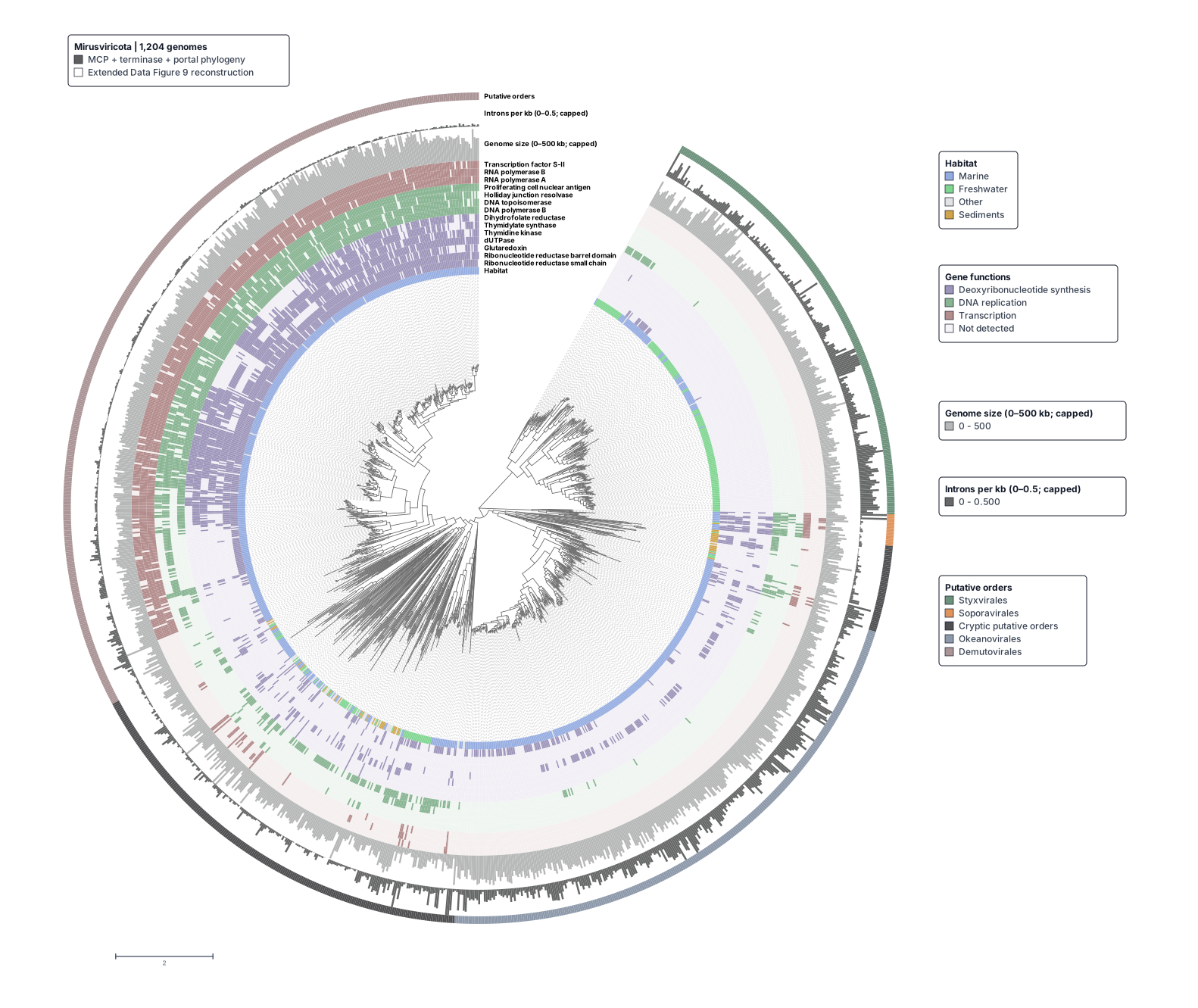
The fitted Mirusviricota tree. See Example 1.
Choose a workflow
| Workflow | Use it for | Start here |
|---|---|---|
| Agent automation | Drive the hosted app through window.__treeviz and inspect diagnostics |
Agent automation |
| Browser app | Explore a tree, add metadata tracks, edit clades, and export a figure | Getting started |
| First figure | Build a six-leaf tree with tracks, a renamed label, and a legend | Your first annotated tree |
| Metadata | Match table rows to leaves and choose categorical or quantitative tracks | Prepare metadata |
| Tree styling | Control labels, branches, node marks, collapsed clades, and figure legends | Tree styling |
| Python package | Build and validate .treeviz.json sessions from scripts or notebooks |
Python package |
| Browser API | Look up methods, command arguments, and session behavior | Browser API |
Start with sourced data
To try TreeViz without installing it, follow the getting-started tutorial. It opens the Mirusviricota tree from Example 1 and walks through its metadata tracks, fitted circular opening, and exported figure.
The example gallery also contains the 3,843-taxon SILVA 123.1 taxonomy from Figure 4 and the 550-taxon TARA Metazoa tree from Figure 3a of Foster et al.. Each example links its saved session, SVG figure, and source paper.
To build a figure from your own files, follow Your first annotated tree. It provides a six-leaf Newick file and a CSV table. The how-to guides cover metadata tracks, labels, and clade styling.
Example 4 reconstructs the archaeal acquisition network in Figure 3 of Nelson-Sathi et al.. It combines the published topology and gene-tree agreement values with synthetic transfer weights. The session and downloads identify the synthetic values.
Where your work lives
Imported files are not uploaded. Sessions lists the sessions saved in this
browser profile, and other visitors do not see them. Export a .treeviz.json
file to keep a copy or move it to another computer. Anyone given a complete
Share link can open the session embedded in that link.
Reference and troubleshooting
- Browser app: input files, Controls, navigation, saving, and exports.
- Add metadata tracks, Edit labels, and Style and collapse clades: task guides for the browser app.
- Exports: figure and data formats.
- Troubleshooting: metadata matching, crowded labels, wedges, and session validation.
- Live app version: current deployed build.
Public scope
This repository contains the public documentation, examples, issue tracker, and agent skill. It does not contain the browser app source or deployment configuration.